Turning Datadog's command palette from a basic page navigator into a unified search, navigation, and action layer — built with Claude Code, shipped to 38K+ active users.
Datadog is a vast product — dozens of pages, thousands of entities, 15+ product areas. Cmd+K is how engineers navigate it all. But the experience hadn't evolved in years.
Cmd+K already had strong traction: 38K active users, 10K weekly active orgs, and 80% conversion on selections. Engineers relied on it daily to jump between dashboards, monitors, logs, and traces during investigation workflows.
But the tool was stuck as a basic page navigator. It showed a flat, unsorted list with no sense of what you actually needed right now. There was no way to scope by product, no visual distinction between entity types, and no ability to take actions — only navigate. Results were unranked, context-unaware, and visually identical.
The gap between what Cmd+K could be and what it was had become the single biggest friction point in Datadog's daily navigation experience.
I ran an internal workshop and research study across Datadog engineering. Eight pain points surfaced — all pointing to the same root cause: Cmd+K was a list, not a tool.
Opens to a flat, unsorted list with no sense of what you actually need right now. Recents, actions, pages, and entities were mixed with no ranking or intent awareness.
No visual distinction between pages, actions, and entities. A dashboard, a service, and a settings page all looked identical — users couldn't tell what they'd get before clicking.
Can't narrow results to just Dashboards, Logs, Incidents, or any other product area. Power users in tools like VSCode expect this — Datadog didn't have it.
From internal workshop to working prototype to shipped product — with a twist: the entire prototype was built with Claude Code.
Ran a cross-functional workshop with engineers across product areas. Collected structured feedback from internal users on pain points, workflows, and aspirations. Identified 8 core issues across UI, UX, and vision categories.
Instead of static mocks, I built a fully functional prototype using Claude Code — 10,365 lines of production React across 18 files. Real API integration with 12+ Datadog endpoints. Real data. Real keyboard navigation. Stakeholders could use it, not just look at it.
Ran internal research with Datadog engineers. Iterated on feedback — added product pill filters, improved entity search ranking, refined visual hierarchy. Shipped behind feature flag, then GA to all users.
Seven changes that turned a page navigator into a command center. Not just navigation — action, context, and discovery.
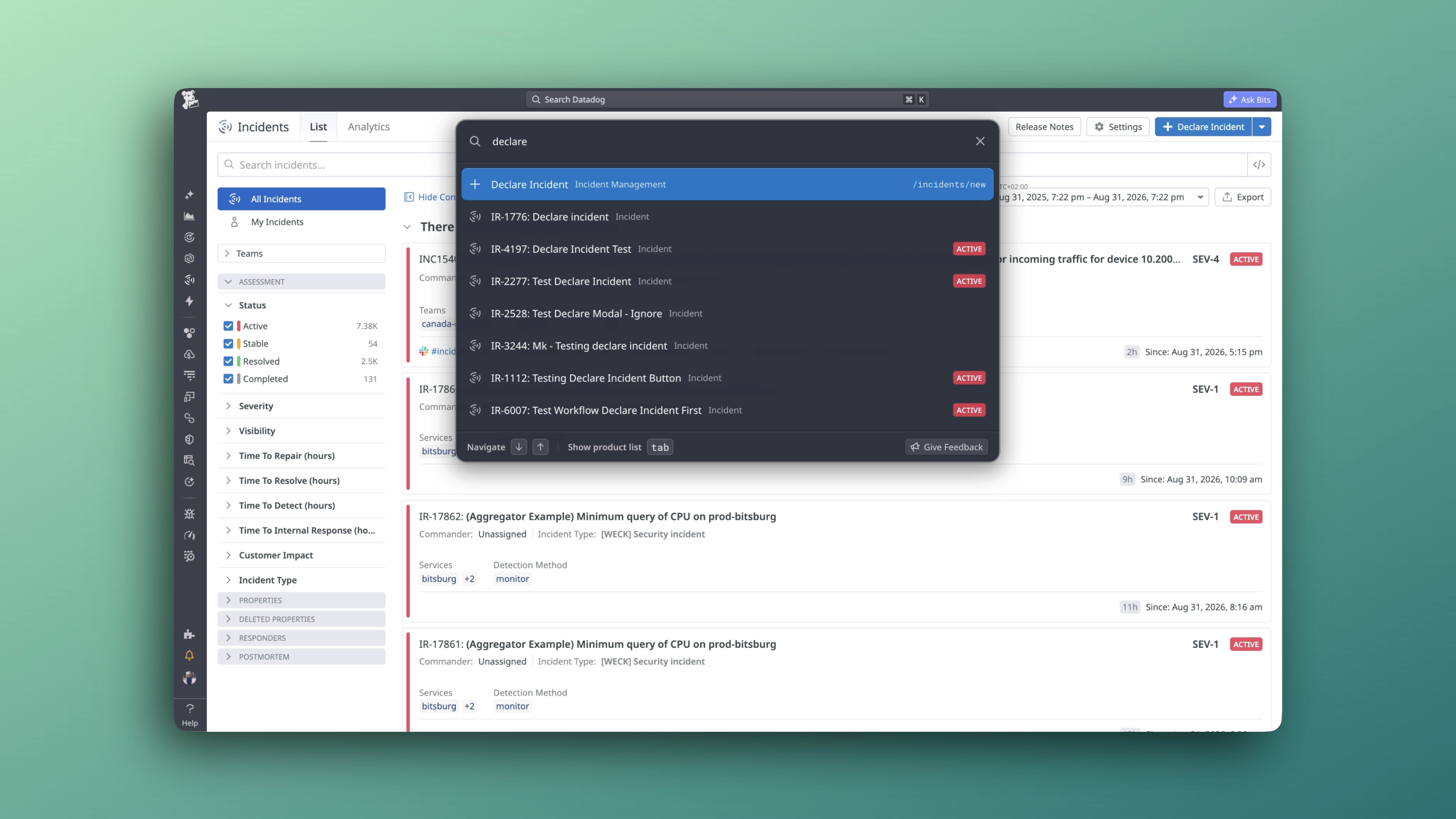
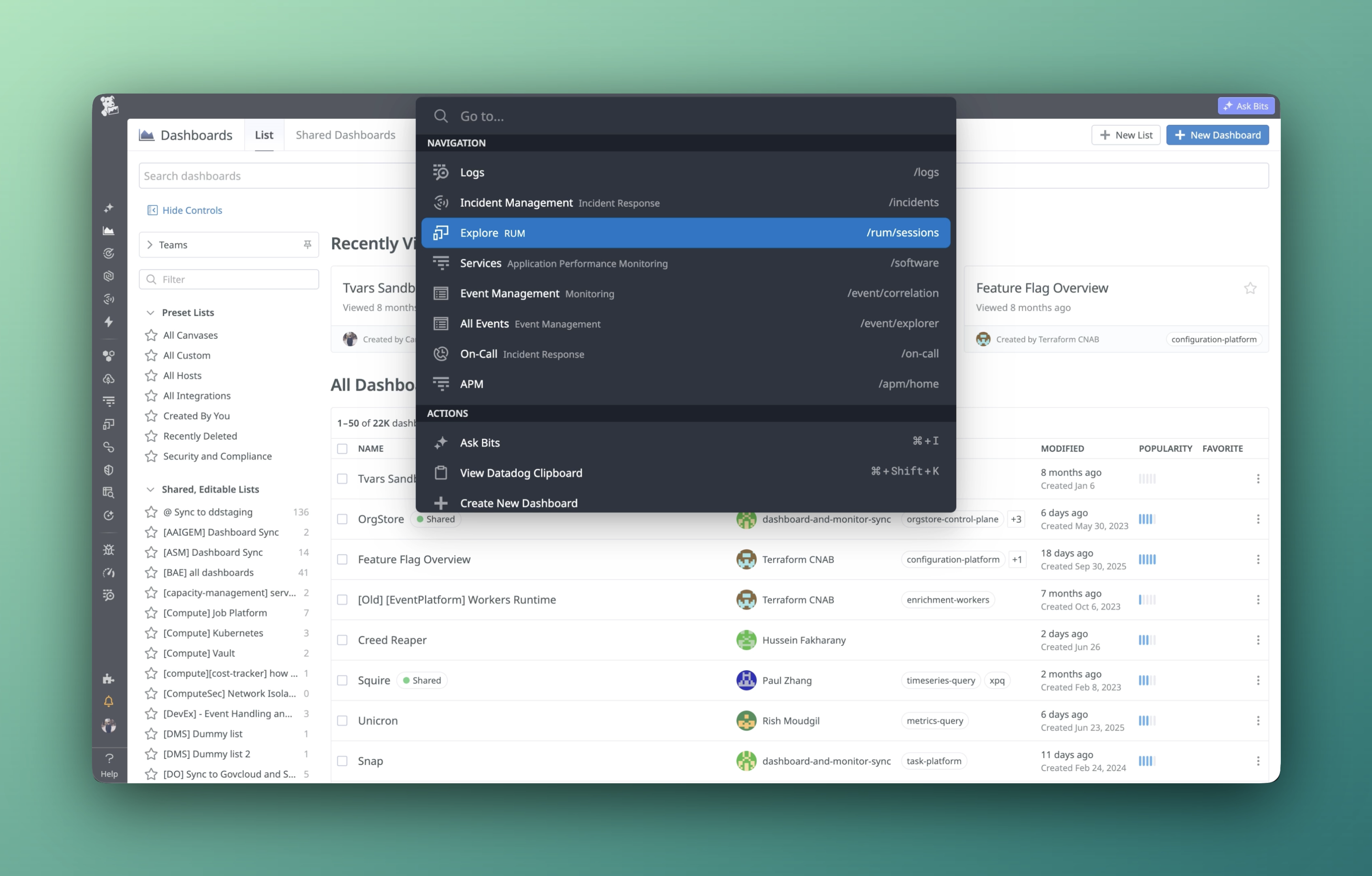
The old Cmd+K had fixed groups: Recents → Actions → Pages → Entities. This ordering rarely matched intent. The new experience replaces rigid sections with a smarter mix of entities that adapts to context, surfacing what matters most based on your current page and usage patterns.
Pages, entities, and actions each have their own visual treatment — different icons, colors, and metadata display. Users instantly recognize what they're looking at before clicking. No more guessing whether a result is a dashboard, a service, or a settings page.
Scope results to Dashboards, Monitors, Logs, APM, Incidents, and 15+ other product areas with one click. Or press Ctrl+Cmd+K to auto-filter based on your current page — if you're in Logs, Cmd+K opens pre-filtered to Logs. The filter pattern users expected from VSCode, now in Datadog.
"Create New Dashboard," "Declare Incident," "Create New Notebook" — actions appear contextually based on your current product area. Cmd+K stops being just a way to find things and becomes a way to do things. From navigator to command palette.
Real-time search across 12+ API endpoints — dashboards, monitors, notebooks, incidents, SLOs, services, integrations, teams, users, and more. Results are merged, deduplicated, and ranked. No more hoping the thing you need is in the static command list.
A full-screen visual grid of every Datadog product, organized into 7 sections — Observability, Digital Experience, Security, Software Delivery, Platform, Service Management, and Mobile. The fastest way to discover a product you didn't know existed or jump to one you rarely visit.
The entire prototype — 10,365 lines of React, 18 files, 12+ live API integrations — was built using Claude Code. Not static mocks. A working product that stakeholders could use, test, and give real feedback on. This changed the design conversation from "imagine this" to "try this."
Shipped to all Datadog users. The foundation for the next generation of navigation, search, and AI-assisted workflows.
Already the most-used navigation tool at Datadog. Adoption continues to grow as features roll out.
4 out of 5 Cmd+K sessions end with the user finding and selecting what they needed.
Dashboards, monitors, notebooks, incidents, SLOs, services, integrations, teams, users — all searchable in real time.
Built with Claude Code. Working React prototype with real data that became the shipped product — not throwaway mocks.
Cmd+K is now the surface for inline AI queries, intent detection, and contextual commands — the roadmap for Cmd+K as an answering engine.
Replacing the old search bar across all Datadog products. Product Map, org switching, and clipboard integration all live here now.